TCG Inventory & Sales Tracker.
Know what every card cost you, what it is worth today, and what you kept when it sold. One free spreadsheet for Pokémon, One Piece and sports cards, in baht and kyat.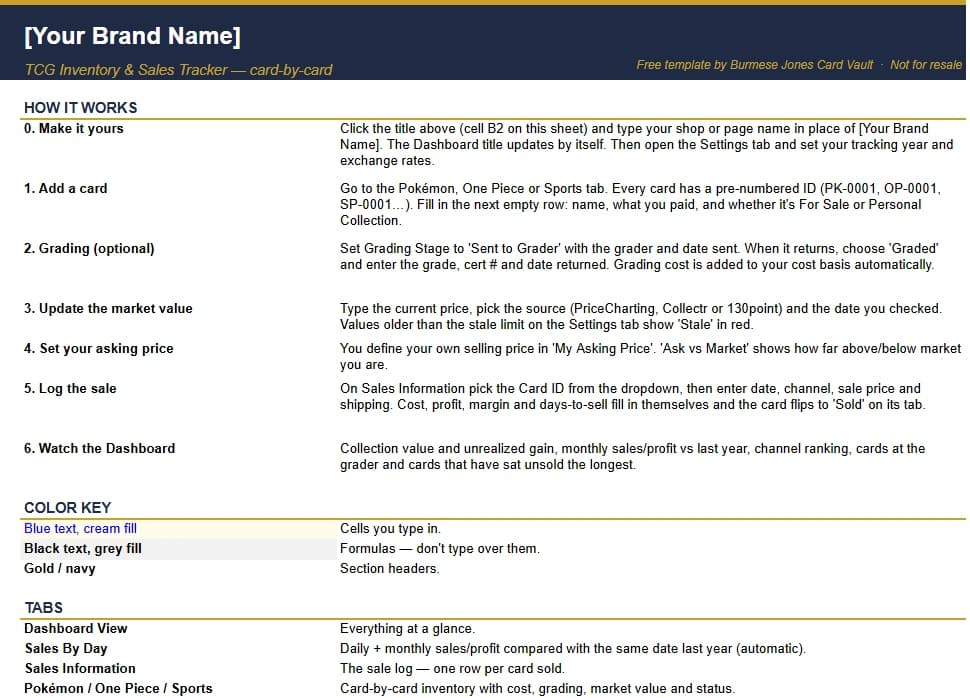
Built for buying, grading and selling.
Everything a card seller or serious collector ends up tracking in scattered notes, in one workbook.Six steps, in the order you will use them.
The cover sheet inside the file says the same thing, so you are never reading this page and the spreadsheet at once.- 01Make it yoursType your shop or page name in the title cell. Set your tracking year and exchange rates on the Settings tab.
- 02Add a cardGo to the Pokémon, One Piece or Sports tab and fill the next empty row: name, what you paid, and whether it is for sale or personal.
- 03Grade it, if you doSet Sent to Grader with the grader and date. When it returns, choose Graded and enter the grade, cert number and date.
- 04Update the valueType the current price, pick the source and the date. Old values flag themselves.
- 05Log the salePick the card ID, then the date, channel, price and shipping. The sheet does the arithmetic.
- 06Read the dashboardCollection value, unrealized gain, monthly sales against last year, channel ranking, cards at the grader and the cards that have sat unsold the longest.
If you buy, sell or hold cards.
You do not need a shop to need the numbers.Two files, one licence.
Start with the examples if you want to see it work first. Start blank if you already know what you are doing.Free to use for tracking your own collection or card business. Not for resale: please do not sell, repackage or redistribute this template, with or without changes.
Questions.
Is it really free?
Yes. There is no signup, no email capture and no catch. The licence is on the cover sheet: free to use for your own collection or card business, and not for resale.
What do I need to use it?
An Excel file (.xlsx) and a spreadsheet program that opens one. Type in the blue cells and leave the grey ones alone, because those are formulas.
What is the difference between the two files?
The blank template is empty and ready for your cards. The With Examples file has a few sample cards and one sale already entered, so you can see how every tab fills in before you start. Delete the examples when you are done.
Does it work for buying and selling in kyat?
Yes. Everything is in Thai baht except market values, which you type in US dollars exactly as the price site shows them. For KBZPay deals, leave the baht price blank, type the kyat amount and pick the payment method. The dashboard totals kyat in and out.
Can I send it to a friend?
Send them this page instead of the file. That keeps the download in one place, and anyone who wants it can get the latest copy.
Can I change it for my own shop?
Yes, for your own use. Add your own channels, graders and sources on the Settings tab. What you may not do is sell it, repackage it or pass it on, with or without changes.